
What we learned building JobWhat as a Chrome extension
Service workers that fall asleep, content scripts on sites we don't control, a Web Store that forgets where users came from, and a performance win we had to take back. The engineering lessons behind JobWhat.
17 min readJobWhat Team
- Engineering
- Chrome extension
- Manifest V3
- Performance
JobWhat is a Chrome extension. It adds buttons to LinkedIn job cards, fills application forms on Greenhouse, Ashby, Lever, Workday and friends, and keeps your whole job search in a Job Log that lives in your browser. Behind it there's a small server and a website, but most of the product, and most of the surprises, live inside Chrome.
We expected building an extension to feel like building a small web app. It doesn't. You're writing code that runs on pages you don't own, inside a runtime that can pause you whenever it likes, shipped through a store that reviews every release. This post collects what we learned the hard way: what broke, what surprised us, and the rules we follow now. Every story here happened in our codebase.
- Service worker suspends when idle — keep state in storage, schedule with alarms (§1).
- Content scripts run in an isolated world beside the page (§2, §8).
- Updates orphan old content scripts until re-inject / refresh (§3).
- Optional host permissions, one origin at a time (§4).
chrome.storage.localdies on uninstall (§9).
1. The service worker is not your server
In Manifest V3 the extension's background page is a service worker, and Chrome stops it whenever it's idle. That's by design. The first time you see "Inactive" next to your worker in chrome://extensions, it looks like a crash. It isn't. It's Chrome saving memory.
The practical consequence is that nothing can live in a variable. Anything that has to survive goes into chrome.storage, and anything that has to happen later goes through chrome.alarms, because a setTimeout dies with the worker. Our worker runs alarms for the daily subscription check, follow-up reminders, the apply queue, refreshing form-filling rules and batching anonymous counts.
The gotcha that bit us hardest was about ordering. On first install, chrome.runtime.onInstalled opens the onboarding tab. Our handler used to do some setup first: mint an anonymous install id, register a menu item, run migrations. Then it opened the tab. One day a fresh install showed no onboarding at all, and the extension looked dead. A chrome.storage callback had simply never come back, so the await never finished and the tab never opened.
The fix was to do the one thing the user can see first, synchronously, and wrap everything else separately:
chrome.runtime.onInstalled.addListener(async (details) => {
  // Install start page MUST open first and synchronously. Any await / throw
  // above it used to leave the owner with no onboarding tab.
  if (details.reason === "install") {
    try {
      chrome.tabs.create({ url: chrome.runtime.getURL("popup.html?onboarding=1"), active: true });
    } catch (e) { /* log */ }
  }
  try { ensureLiTourMenu(); } catch (e) { /* log */ }
  // ...then the slower, awaitable setup
});
We also stopped trusting storage to always answer. Anything on a critical path now races a timeout:
/** Reject if chrome.storage never calls back (rare wedged SW / profile). */
function withStorageTimeout(promise, ms, label) { /* setTimeout + reject */ }
We learned the same lesson on the network side earlier: licence checks could hang, so they now have a 20-second fetch timeout and the popup has watchdogs. In an extension, a callback that never fires is a normal failure, not an impossible one.
2. Your code runs in someone else's house
A content script runs inside a page you don't control. LinkedIn, Workday and every applicant tracking system ship new markup whenever they like, and nobody tells you.
Some examples from our history:
-
LinkedIn job cards became
role="button". Our title lookup assumed a link. Overnight the buttons had nothing to attach to until we taught the finder to look inside the new shape. -
A page that never finished loading. On one LinkedIn page, a tracking iframe hung and
document.readyStatenever reachedcomplete. We had been waiting for it. Now we start once the DOM is ready and has stopped changing. -
Our buttons ended up inside LinkedIn's Easy Apply button. We find job cards with a list of selectors, one of which was
[data-job-id]. LinkedIn also putsdata-job-idon its apply button. So we treated the apply button as a job card, mounted a second row of chips inside it and painted it yellow, which made its white label unreadable. The fix excluded apply controls and the detail pane from card matching, refused to tint apply controls, and added a fixture test that asserts the Easy Apply button's classes, styles and label are untouched even after the page re-renders it. -
Invisible isn't hidden. Ashby renders some radio buttons at
opacity: 0and draws its own UI on top. Our "skip hidden fields" check skipped them. Now we fill them.
Forms built with React have their own trap. Setting input.value = "…" changes the DOM but not React's internal state, so the next render quietly puts the old value back. You have to call the element's own native setter, reset React's value tracker and fire real events:
// Reset React's tracker so a controlled input sees a change.
const tracker = el._valueTracker;
if (tracker && typeof tracker.setValue === "function") tracker.setValue("");
const desc = Object.getOwnPropertyDescriptor(Object.getPrototypeOf(el), "value");
if (desc && desc.set) desc.set.call(el, value);
el.dispatchEvent(new Event("input", { bubbles: true }));
el.dispatchEvent(new Event("change", { bubbles: true }));
Note Object.getPrototypeOf(el): using HTMLInputElement.prototype's setter on a <select> throws, and at one point that exception aborted a whole fill. Typeaheads are worse. Some location fields only commit when you click a suggestion, not when you press Enter, and another committed a truncated city name when we typed only a prefix of it. Selectors are a liability you pay down forever. Pin each bug with a fixture page that reproduces it, using fictional markup, so the next markup change fails a test instead of a user.
3. Updates orphan your content scripts
When the extension updates or reloads, content scripts already running in open tabs don't go away. They keep running, cut off from the extension. The first chrome.* call throws Extension context invalidated, and it keeps throwing until the user refreshes the tab.
We now guard every call that can outlive the extension:
/** False after the extension is reloaded/removed — chrome.* throws
 * "Extension context invalidated" on open tabs until they refresh. */
function extAlive() {
  try {
    return Boolean(chrome.runtime && chrome.runtime.id);
  } catch (e) {
    return false;
  }
}
That fixes the errors, but it leaves users with a tab full of dead buttons. So after an update the worker injects fresh scripts into open LinkedIn and job-board tabs, and the new copy tears down the stale one rather than backing off because "a copy is already here." We also put the build into the manifest's version_name, so even a same-version reload hands over properly.
Re-injection caused its own bug. Our shared config.js defines global constants and locks one of them with Object.defineProperty(..., { configurable: false }). Evaluate it twice in the same tab and you get Identifier 'JAF_CONFIG' has already been declared or Cannot redefine property. That can happen once from the manifest and once from our re-injection. The file is now an idempotent IIFE:
(function (globalThis) {
  if (Object.prototype.hasOwnProperty.call(globalThis, "JAF_IS_DEV_BUILD")) return;
  const JAF_CONFIG = { /* ... */ };
  // ...install globals and the non-configurable lock once
})(globalThis);
We also check whether a tab already has our config before injecting, and only add the board-specific script if it does. Assume every script you ship will run twice, and some copies will outlive the extension that loaded them.
4. Permissions are product decisions
Permissions look like a line in manifest.json. In practice they decide your store review, your install conversion and whether existing users keep the extension turned on.
-
Broad host patterns are expensive. We used to match careers pages with patterns like
https://*/careers/*. That triggers a host-permission warning in the Web Store dashboard and draws review scrutiny. We removed all 14 of those patterns. Now, when a user clicks "Enable JobWhat on this site," we request that single origin withchrome.permissions.requestand register our scripts there withchrome.scripting.registerContentScripts. The broad pattern only lives inoptional_host_permissions, which isn't granted at install. -
The user gesture is fragile.
chrome.permissions.requesthas to be called from a user action. Put anawaitin front of it and Chrome drops the gesture and the prompt fails. Our code says so right above the function: "no awaits before permissions.request or Chrome drops the gesture." -
New permissions can switch you off. When an update adds a permission that comes with a warning, Chrome disables the extension for existing users until they accept it. So permission changes are never automatic for us. A CI guard fails any PR that changes the manifest until a human adds an approval label, and our automated fix pipeline isn't allowed near the manifest.
-
Every permission needs a reason reviewers will accept. Before submitting, we dropped the
cookiespermission and a fallback that read another site's session cookie. It was technically useful. It was also exactly the kind of thing reviewers reject. We also removedweb_accessible_resourcesentirely, so nochrome-extension://URL ever lands in a page's DOM where a site could probe for it. A test guards that.
5. The Web Store forgets where users came from
We wanted creators to be able to share JobWhat and get credit for installs. On the web that's a ?ref=code parameter. The Chrome Web Store drops query parameters on the way to install, and the extension can't read our website's cookies. The referral simply vanishes at the store.
Our bridge is a first-party handoff. The creator link lands on our own site, which remembers the code. After install, the extension quietly opens a page on our site in an inactive tab. That page posts the code back to the extension through externally_connectable, and the tab closes. Creators can also type a creator code during onboarding, which works for video and podcast links where nobody clicks anything.
Two lessons came out of it. First, the handoff briefly took over the install experience. For a while, new users landed on our website's welcome page instead of onboarding. Onboarding is the active tab again, and the handoff tab stays in the background and closes itself, with a five-second fallback. Second, externally_connectable means a web page can message your extension, so treat it like a public API. Ours accepts one message type from one exact origin, validates the code against a strict pattern and replies with only { ok: true } or { ok: false }. Nothing about the user leaves the extension.
6. You can't hotfix: releasing on a reviewed platform
On the web, a bad deploy is fixed with another deploy. In an extension, every code change goes through Chrome Web Store review. That can take hours or days, and you can only have one submission pending. Remote code is prohibited, so there's no shortcut.
That shaped our whole release process:
-
Data, not code, for most fixes. Much of the autofill logic reads a "rule pack": JSON listing answer synonyms, widgets to ignore and named quirks. The bundled code checks it against a strict schema. Nothing in it is ever evaluated, turned into a selector or injected. A new rule pack reaches users in minutes, with no review, because it's data.
-
Versions must only go up. The store rejects uploads that don't raise
version, so our bump tool turns the build date into the version (2026.09.25.16→2026.9.25.16) and refuses to go backwards. -
Roll out gradually with your own flags. The store only offers percentage rollouts to large extensions, so we built our own. Every code fix that changes how forms get filled ships behind a check like
JAF_FIXES.isOn("<fixId>"), starts at 0% and is ramped up from an admin screen. It keeps the old code path, so turning it off is instant. -
Fixes are tied to the errors they close. A code fix PR includes a small manifest listing the error clusters it targets:
{
  "fixId": "code-location-typeahead-click",
  "scope": "extension",
  "build": "pending",
  "clusterIds": ["ashby|location|click did not commit", "lever|location|click did not commit"],
  "rollout": "none"
}
Our release workflow is built to mark those errors fixed, with the live build number, once the store publishes the build. "Fixed" then means "users can actually get it," not "merged."
- Update when idle, don't poll. Chrome already checks for updates every few hours, and
requestUpdateCheck()is throttled. Instead of polling, we apply a downloaded update when the user isn't in the middle of something: no fill in progress, no queue running. Six hours is the hard limit.
7. Performance: what we measured, what we shipped, and what we took back
This is the section we're least proud of and learned the most from.
How we measured
We wrote a repeatable harness. It launches Playwright's Chromium build with the unpacked extension loaded (--load-extension, new headless mode). The system Chrome build often failed to register MV3 service workers in that setup, so we used Playwright's. The harness drives fictional fixture pages: a LinkedIn-style results list with 25 cards, one with 200 cards and infinite scroll, a Greenhouse-style application form, and Job Logs seeded with 50, 1,000 and 5,000 made-up applications. It reads Chrome DevTools Protocol metrics (Performance.getMetrics for JS heap and event listener counts), records long tasks with a PerformanceObserver, and captures CPU profiles. No real LinkedIn pages and no user data.
What we found
The profile was humbling:
-
The Job Log loaded a map library before first paint, every time. About 3.0 MB of JavaScript was parsed on every open, including MapLibre at about 972 KB, even though most visits never open the map.
-
The popup eagerly loaded education data (about 314 KB) and a PDF reader (about 377 KB), needed only when you upload a résumé.
-
Content scripts are heavy. About 790 KB is injected on LinkedIn and about 990 KB on application forms, per page load.
-
About 57 event listeners and 13 extra DOM nodes per LinkedIn job card. On a 200-card list that's roughly 11,400 listeners.
-
Scrolling LinkedIn was dominated by a shadow-DOM lookup,
openOrClosedShadowRoot, called on every node we walked. -
Our "did the application submit?" watcher read
document.body.innerTexton every DOM mutation. On busy forms that's a lot of layout work. -
Job Log memory scaled with the whole log, even though the page only renders a slice of rows.
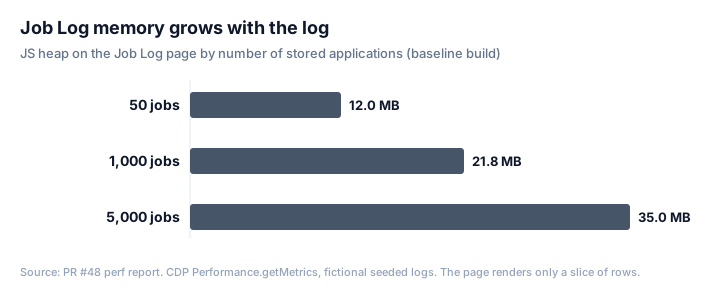 on the baseline build with fictional seeded logs. Source: our internal perf report for PR #48.")
What we changed, and the numbers
One PR landed five changes. It lazy-loaded the map and the résumé libraries. It skipped the expensive shadow-root call on ordinary elements. It debounced the submit watcher and had it read headings instead of the whole page. It replaced a 700 ms URL poll on LinkedIn with History API hooks. And it rendered 150 Job Log rows up front instead of 300.
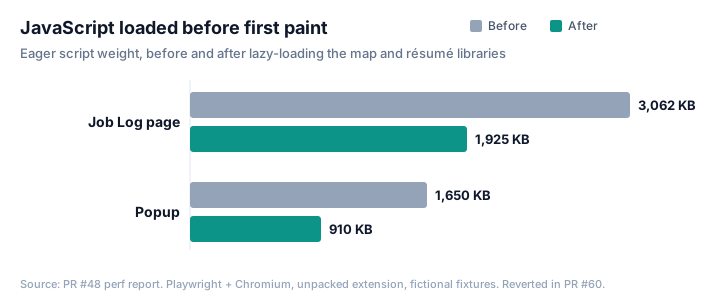
| Measurement (fictional fixtures) | Before | After |
|---|---|---|
| Job Log scripts loaded eagerly | 3,062 KB | 1,925 KB |
| Popup scripts loaded eagerly | 1,650 KB | 910 KB |
| Popup time to interactive | 2,630 ms | 1,430 ms |
| Job Log heap, 50-job log | 12.02 MB | 10.31 MB |
| LinkedIn 25-card page, load timing | 3,017 ms | 3,013 ms |
We tried to be honest about what the numbers did and didn't show. The byte cuts and the popup's 1.2-second improvement were solid. The LinkedIn shadow-root change removed the hotspot from the scroll profile but didn't move page timing at all. On the 5,000-job log, heap bounced around between runs, from about 35 MB to 56 MB, so we marked it as noise rather than claim a win or a loss. The Job Log's time-to-interactive numbers included fixture settle waits, so we trusted bytes and heap over them.
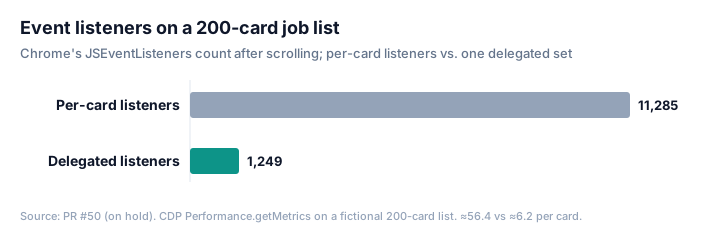
A follow-up went after the listener count. Instead of attaching handlers to every chip on every card, it used one small set of listeners on document, routed by a data- attribute. On the 200-card fixture, Chrome's listener count dropped from 11,285 to 1,249, about 6 per card instead of 56. Heap after scrolling went from 5.49 MB to 4.19 MB. Long-task time didn't change meaningfully (2,030 ms vs. 2,104 ms, within noise).
Then we took it back
Soon after the first PR merged, the Job Log started hanging. It became unclickable and behaved oddly. We didn't try to find the guilty change under pressure. We reverted all five runtime changes at once, and kept the harness, the report and every unrelated fix that had landed on the same files since. The listener PR was put on hold before it merged. So the charts above are measurements from branches, not what's in your browser today.
Looking back, the mistakes weren't in the measuring. They were in the shipping:
-
Five behavior changes in one PR. When something broke, we couldn't tell which one did it, so all of them had to go.
-
No flag. Our autofill fixes can be switched off from an admin screen in seconds. These perf changes could only be undone with a new build and another store review.
-
A visible change hiding in a perf PR. Halving the Job Log's first page changes what users see. It deserved its own PR and its own sign-off.
-
Passing fixtures aren't a passing product. We never pinned down which change caused the hang. Our fixture runs were green and the Job Log hung anyway. Lazy-loading, debouncing and swapping a poll for hooks all change when code runs, and timing is exactly what a fixture misses.
Our rule now: measure first with the harness, then ship one change per PR. Put anything that changes runtime behavior behind a flag that starts off. Keep the old path until the new one has proven itself, and keep visible changes out of perf work. The harness stays. It's how we'll know the next attempt actually worked.
8. Testing a real extension is its own discipline
We test with Playwright against a real, unpacked extension, not mocks. A few things we learned:
-
Content scripts live in an isolated world.
page.evaluateruns in the page's world and can't see anything your content script defined. To drive our fill engine in tests, we run code throughchrome.scripting.executeScriptin the extension's world. -
Custom controls hide the real input. Our toggles hide the actual
<input>with CSS, so "wait until visible" waits forever. Tests interact with them the way the page does. -
Classify every red test. When CI blocked a release, we sorted every failure into three buckets: a real product bug, a stale test, or harness flakiness. Several were genuine autofill bugs, such as a country phone code field getting the whole phone number and a Workday date losing its month, and five of them got their own fix manifests. The rest were tests asserting old copy or old UI. Truly flaky suites go on a quarantine list with a linked issue, so they don't hold releases hostage and don't get forgotten either.
9. Local-first means one uninstall from zero
Your profile, documents and Job Log live in chrome.storage.local, in your browser. That's a privacy feature we care about, and it has a sharp edge: uninstalling the extension deletes its storage. There's no server copy unless you turn on cloud sync.
That changes how we write support answers. "Remove and reinstall the extension" is standard troubleshooting advice for most software. For us it can wipe months of job search history, so we never give it. The export under Settings → Your data (everything as JSON, saved passwords left out) is the first thing we point people to, and fixes are designed to work without a reinstall. It's also why the update handoff in section 3 matters so much: a refresh has to be enough.
10. Observability without spying on users
When autofill misses a field on someone's form, we need to know. We don't want to know who they are. Our structured error logs carry the applicant tracking system, the hostname, the field, the reason and the build. The value we tried is logged only for option mismatches ("no matching option" for a dropdown), never for free text, names, emails, phone numbers or addresses. There are no install ids, emails or IP addresses in those logs, and a server test asserts they're absent.
Reports are grouped into clusters like ashby|location|click did not commit. We're setting up a daily automated triage that reads the clusters and drafts fix PRs for a human to review. That loop, from cluster to fix to manifest to "live in build X", is what makes the release constraints in section 6 bearable.
Gotchas cheat sheet
-
"Inactive" service worker is normal. Keep state in
chrome.storageand schedule withchrome.alarms, never with variables and timers. -
In
onInstalled, do the visible thing first. Open the onboarding tab before anyawait, and wrap everything else separately. -
Storage callbacks can hang. Race critical reads against a timeout.
-
Old content scripts outlive updates. Guard
chrome.*calls with anextAlive()check, and have re-injected copies take over from stale ones. -
Every script will run twice. Make globals and
definePropertylocks idempotent. -
Broad selectors match things you didn't mean.
[data-job-id]matched an apply button. Exclude controls you must never touch, and test that you didn't touch them. -
Don't wait for
readyState === "complete"on third-party pages. A hung iframe can stop it forever. -
opacity: 0isn't hidden. Custom widgets often draw over a real input. -
React-controlled inputs need the element's own native value setter, a value tracker reset, and real
input/changeevents. -
Never
awaitbeforechrome.permissions.request, or the user gesture is lost. -
Prefer per-origin optional host permissions registered at runtime over broad
host_permissions. -
New warning-level permissions disable the extension for existing users until they accept. Gate manifest changes behind human approval.
-
Leave out
web_accessible_resourcesif you can, so pages can't probe for your extension. -
The Web Store drops query parameters. Attribution needs a first-party handoff or a code the user types in.
-
Treat
externally_connectablelike a public API: one origin, one message type, strict validation, minimal replies. -
No remote code. Ship behavior as bundled code plus schema-checked JSON data.
-
Store versions only go up, and you get one pending submission. Plan releases like trains.
-
Build your own percentage rollouts and kill switches. Wrap behavior changes in flags that start at 0%.
-
Perf changes are behavior changes. Measure with a harness, ship one change per PR behind a flag, and keep it easy to revert.
-
Tests can't see the content-script world from
page.evaluate. Usechrome.scripting.executeScript. -
Local data dies with the extension. Never tell users to reinstall, and make export easy to find.
What's next
Building JobWhat as an extension was the right call. It's the only way to put a button on a LinkedIn card or fill a form in the tab you're already in. But the platform rewards a particular kind of caution: expect callbacks that never fire, expect pages to change under you, and ship everything in a way you can take back. We're still learning. The perf work will come back, one flagged change at a time, with the harness keeping score.
If you're building an extension and hit a gotcha we missed, tell us through the Feedback button at the bottom right of this page. And if you're job hunting, add JobWhat to Chrome.